Know Exactly How Long Your Content Takes to Read
📥 Install from Chrome Web Store
Get instant, accurate reading time estimates for any text. Whether you’re writing blog posts, articles, or presentations, Reading Time Calculator helps you optimize content length and improve reader engagement.
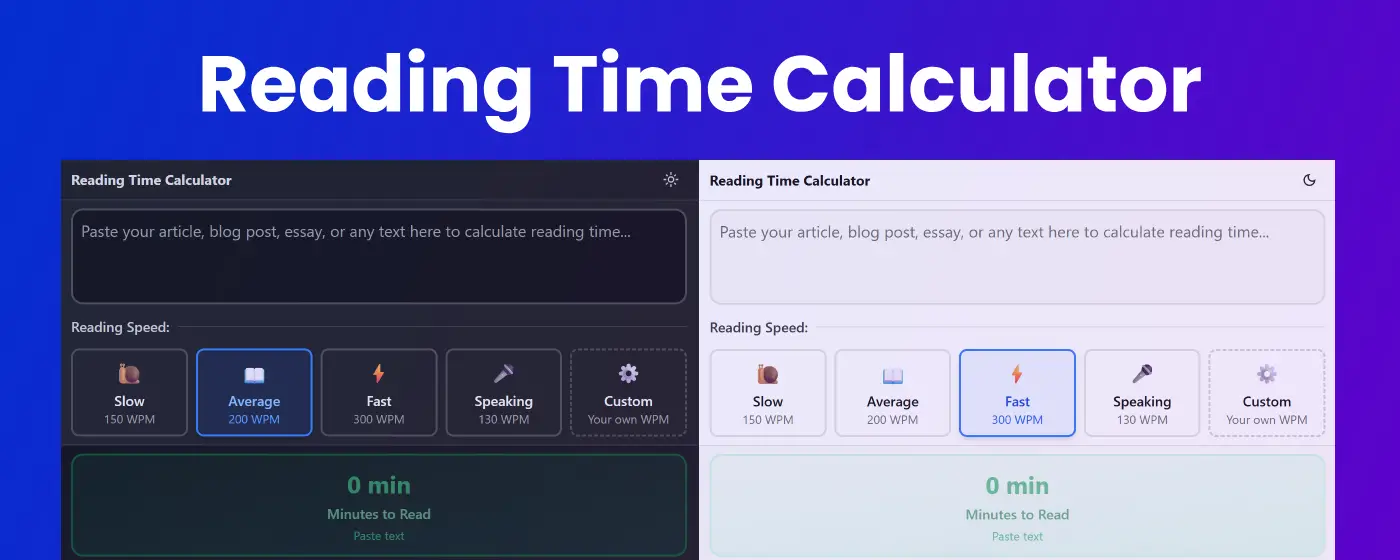
Multiple Reading Speed Profiles
Pre-Configured Speeds
- 🐌 Slow (150 WPM) – Careful, detailed reading
- 📖 Average (200 WPM) – Normal reading pace for most content
- ⚡ Fast (300 WPM) – Quick scanning and skimming
- 🎤 Speaking (130 WPM) – Presentation and speech delivery
Customizable Speed
- ⚙️ Custom Speed – Set your own reading speed (50-1000 WPM)
- Personal calibration – Match your exact reading pace
- Speed preferences saved – Your settings persist across sessions
Key Features
📊 Comprehensive Text Analysis
- Reading time estimate – Accurate predictions based on selected speed
- Word count – Total number of words in your text
- Character count – Including spaces for precise metrics
- Sentence count – Analyze text structure and complexity
- Multi-speed comparison – See estimates for all reading speeds at once
⚡ Real-Time Calculation
- Instant results – Updates as you type
- Live statistics – Watch metrics change in real-time
- No delays – Immediate feedback for quick decisions
- Always visible – Results display even with empty text
📋 Powerful Tools
- File upload – Analyze documents directly (.txt, .md, and more)
- Copy statistics – Export full analysis report with one click
- Clear function – Reset your workspace instantly
- Detailed report – Get comprehensive reading time breakdown
🎨 Beautiful Interface
- Color-coded cards – Easy-to-read statistics with gradient backgrounds
- Dark mode support – Comfortable viewing in any lighting
- Responsive design – Works perfectly on any screen size
- Visual indicators – Emojis and icons for quick recognition
🔒 Privacy Focused
- Local processing – All calculations happen in your browser
- No data collection – Your text stays completely private
- Offline capable – Works without internet connection
- Zero tracking – No analytics or third-party scripts
Perfect For
Content Creators & Bloggers
- Optimizing article length for reader engagement
- Meeting publication word count requirements
- Planning content series and multi-part posts
- Balancing reading time across content calendar
Writers & Authors
- Estimating chapter reading times
- Planning book pacing and structure
- Meeting manuscript length requirements
- Analyzing text density and readability
Editors & Publishers
- Quality control for content length
- Standardizing reading time across publications
- Planning magazine and journal layouts
- Creating reader-friendly content guidelines
Speakers & Presenters
- Timing presentations and speeches
- Planning talk duration accurately
- Adjusting script length for time slots
- Rehearsing with accurate time estimates
Marketing Teams
- Optimizing email length for engagement
- Creating consistent newsletter formats
- A/B testing content length
- Meeting platform-specific reading time targets
Students & Researchers
- Planning study time for reading assignments
- Estimating research paper length
- Managing reading workload
- Creating balanced reading schedules
Common Use Cases
Blog Post Optimization
Article: "The Ultimate Guide to Productivity"
- 1,500 words
- Average speed: 7-8 minutes
- Fast speed: 5 minutes
- Speaking: 11-12 minutes

Perfect for: Medium-length blog posts that keep readers engaged
Presentation Timing
Speech Script: "Quarterly Review Presentation"
- 2,000 words
- Speaking speed: 15-16 minutes
- Allows time for: Slides and Q&A

Perfect for: 20-minute presentation slots
Email Marketing
Newsletter Content: "Weekly Product Updates"
- 400 words
- Average speed: 2 minutes
- Fast speed: 1-2 minutes

Perfect for: Quick-read email campaigns
Academic Reading
Research Paper: "Climate Change Effects"
- 8,000 words
- Slow speed: 53-54 minutes
- Average speed: 40 minutes

Perfect for: Planning study sessions
Why Choose Reading Time Calculator?
⏱️ Accurate Estimates – Based on scientifically-proven reading speeds
🎯 Multiple Speeds – Compare different reading scenarios instantly
⚙️ Fully Customizable – Set your personal reading speed
📈 Detailed Analytics – Get comprehensive text statistics
💾 Smart Memory – Saves your speed preferences automatically
🛡️ Privacy First – Your content never leaves your browser
How It Works
- Paste your text – Enter content or upload a file
- Choose reading speed – Select preset or set custom speed
- View instant results – See reading time and statistics
- Copy or analyze – Export report or adjust content length
Understanding Reading Speeds
Slow (150 WPM)
- Careful, analytical reading
- Technical documentation
- Legal or medical texts
- Poetry and complex literature
Average (200 WPM)
- Standard reading pace for most adults
- Blog posts and articles
- Novels and general content
- Educational materials
Fast (300 WPM)
- Skimming and scanning
- Familiar content
- Quick reviews
- Social media posts
Speaking (130 WPM)
- Natural speech pace
- Presentations and speeches
- Podcasts and narration
- Audio content planning
Custom Speed
- Personalized to your actual reading pace
- Test with timed reading exercises
- Adjust based on content type
- Perfect for unique requirements
Pro Tips
For Content Creators:
- Aim for 5-10 minute reading time for blog posts
- Use 1-2 minutes for social media content
- Keep emails under 3 minutes for best engagement
- Match reading time to audience attention span
For Presenters:
- Always use Speaking speed for presentations
- Add 20% buffer time for slides and pauses
- Practice with your script at actual speaking pace
- Account for audience interaction time
For Writers:
- Track reading time per chapter for consistency
- Use slow speed to estimate careful reading
- Balance dialogue (faster) and description (slower)
- Consider your target audience’s reading habits
For Marketers:
- Test different lengths for A/B optimization
- Match reading time to platform (Twitter vs. Medium)
- Consider mobile vs. desktop reading speeds
- Use data to inform content strategy
Statistics Report Export
Generate detailed reports including:
- Complete text statistics (words, characters, sentences)
- Reading time for all speed profiles
- Custom speed calculations
- Ready-to-share formatted report
🚀 Install now and optimize your content for perfect reading time!
Quick Start Guide
- Click the extension icon in your Chrome toolbar
- Paste your text – Or upload a text file
- Select reading speed – Choose preset or create custom
- View results – Get instant reading time and statistics
- Export report – Copy detailed analysis with one click
No registration required. No learning curve. Just instant, accurate reading time calculations.
Coming Soon: Browser integration to calculate reading time for any web page with one click. Stay tuned for updates!