Professional Text Analysis in Real-Time
📥 Install from Chrome Web Store
Get instant, accurate word count and comprehensive text statistics for any content. Whether you’re writing essays, articles, or social media posts, Word Counter helps you meet requirements and optimize your text.
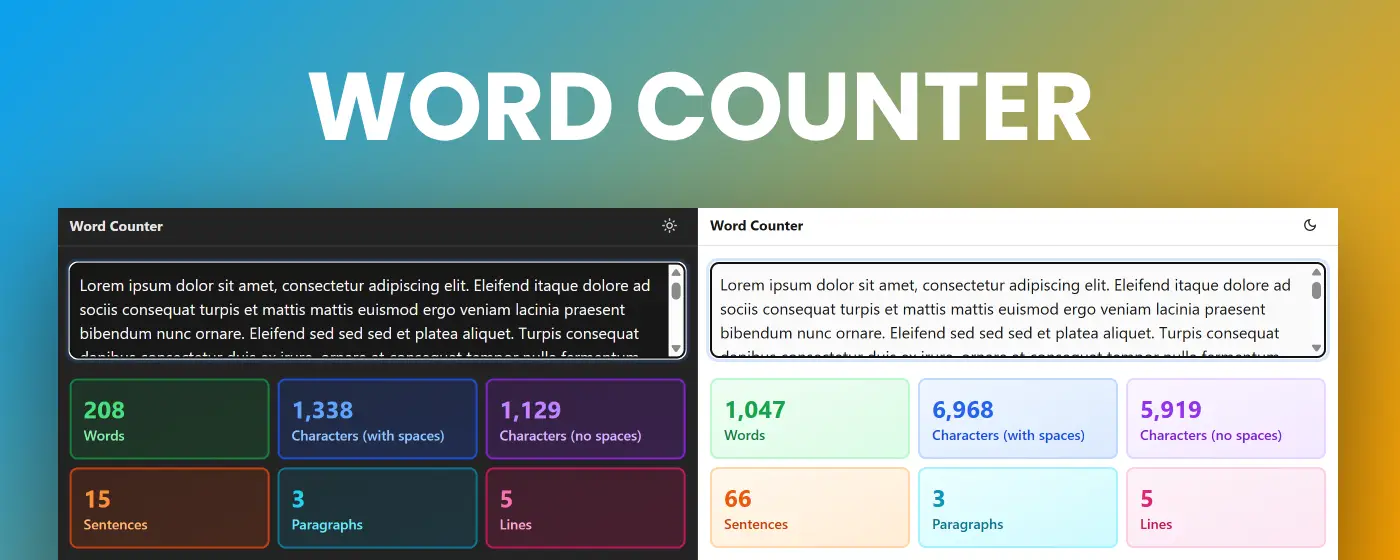
Complete Text Statistics
Core Metrics
- 📝 Words – Total word count with accurate counting
- 🔤 Characters (with spaces) – Complete character count including spaces
- ✂️ Characters (no spaces) – Pure text length without spacing
- 📄 Sentences – Sentence count for readability analysis
- 📑 Paragraphs – Paragraph structure breakdown
- 📏 Lines – Line count for formatting reference
Key Features
📊 Comprehensive Analysis
- 6 key statistics – Everything you need in one view
- Real-time updates – See counts change as you type
- Accurate calculations – Precise counting algorithms
- Always visible – Statistics display even with empty text
- Color-coded cards – Easy-to-read visual indicators
⚡ Real-Time Performance
- Instant counting – Updates as you type
- Live metrics – Watch statistics change in real-time
- No lag – Smooth performance even with large texts
- Responsive interface – Works flawlessly on any device
📋 Powerful Tools
- File upload – Analyze documents directly (.txt, .md, and more)
- Copy statistics – Export full analysis report with one click
- Clear function – Reset your workspace instantly
- Detailed report – Get comprehensive text breakdown
🎨 Beautiful Interface
- Gradient backgrounds – Vibrant, modern design with smooth transitions
- Dark mode support – Comfortable viewing in any lighting condition
- Visual animations – Smooth opacity changes when adding text
- Responsive layout – Perfect display on mobile, tablet, and desktop
🔒 Privacy Focused
- Local processing – All analysis happens in your browser
- No data collection – Your text stays completely private
- Offline capable – Works without internet connection
- Zero tracking – No analytics or third-party scripts
Perfect For
Writers & Authors
- Meeting word count requirements for articles and books
- Tracking writing progress and daily goals
- Ensuring consistent chapter lengths
- Analyzing text structure and flow
Students & Academics
- Meeting essay and paper word limits
- Checking assignment requirements
- Analyzing research papers
- Managing thesis and dissertation length
Content Creators & Bloggers
- Optimizing blog post length for SEO
- Meeting platform-specific character limits
- Creating consistent content formats
- Planning content calendars
Social Media Managers
- Staying within character limits (Twitter, Instagram, LinkedIn)
- Optimizing post length for engagement
- Crafting perfect meta descriptions
- Creating platform-specific content
Copywriters & Marketers
- Writing email subject lines (50-60 characters)
- Crafting meta descriptions (155-160 characters)
- Creating ad copy within limits
- Optimizing headlines and CTAs
Editors & Publishers
- Quality control for content length
- Standardizing article formats
- Managing publication guidelines
- Ensuring consistency across content
Common Use Cases
Essay Writing
Assignment: "Climate Change Research Paper"
- Required: 1,500-2,000 words
- Current: 1,847 words ✓
- Characters: 11,234
- Sentences: 89

Perfect for: Meeting academic requirements
Blog Post Optimization
Article: "10 Productivity Tips for Developers"
- Target: 1,200-1,500 words for SEO
- Current: 1,342 words ✓
- Characters: 8,156
- Paragraphs: 18

Perfect for: Search engine optimization
Social Media Content
Twitter Post: "Product Launch Announcement"
- Limit: 280 characters
- Current: 267 characters ✓
- Words: 42

Perfect for: Platform-specific content
Email Marketing
Subject Line: "Don't Miss Our Black Friday Sale!"
- Recommended: 50-60 characters
- Current: 38 characters ✓
- Words: 6

Perfect for: Email campaign optimization
Why Choose Word Counter?
📈 Accurate Counting – Precise algorithms for reliable statistics
⚡ Real-Time Analysis – Instant updates as you type
🎨 Beautiful Design – Modern interface with vibrant gradients
📊 Complete Statistics – 6 essential metrics in one view
💾 Smart Export – Copy detailed reports with one click
🛡️ Privacy First – Your content never leaves your browser
How It Works
- Paste your text – Enter content or upload a file
- View instant statistics – See all metrics update in real-time
- Analyze your content – Check words, characters, sentences, and more
- Copy or export – Generate detailed report for sharing
Understanding Your Statistics
Word Count
- Most important metric for writers
- Used for assignments, articles, and books
- Excludes extra spaces and formatting
- Industry standard for content length
Characters (with spaces)
- Total length including all spaces
- Used for social media limits
- Important for platform restrictions
- Standard for most character limits
Characters (no spaces)
- Pure text length measurement
- Used in some academic contexts
- Alternative character counting method
- Useful for specific requirements
Sentence Count
- Indicates text complexity
- Helps assess readability
- Useful for pacing analysis
- Important for editing
Paragraph Count
- Shows content structure
- Indicates visual breaks
- Helps with formatting
- Useful for layout planning
Line Count
- Technical measurement
- Useful for scripts and code
- Helps with formatting
- Alternative length indicator
Platform Character Limits Reference
Social Media:
- Twitter/X: 280 characters
- Instagram Caption: 2,200 characters
- LinkedIn Post: 3,000 characters
- Facebook Post: 63,206 characters
- TikTok Bio: 80 characters
SEO & Marketing:
- Meta Description: 155-160 characters
- Title Tag: 50-60 characters
- Email Subject Line: 50-60 characters
- Google Ad Headline: 30 characters
Professional:
- SMS Message: 160 characters
- Tweet Thread: 280 per tweet
- YouTube Description: 5,000 characters
- Pinterest Pin Description: 500 characters
Pro Tips
For Students:
- Start counting early to track progress
- Use character count for strict limits
- Check sentence count for readability
- Monitor paragraph count for structure
For Writers:
- Set daily word count goals
- Track progress across writing sessions
- Use statistics to maintain consistency
- Analyze different writing styles
For Content Creators:
- Know platform limits before writing
- Optimize for SEO word count ranges
- Balance word count with readability
- Use statistics for A/B testing
For Social Media:
- Always check character limits first
- Leave room for hashtags and mentions
- Consider mobile display truncation
- Test different lengths for engagement
Statistics Report Export
Generate detailed reports including:
WORD COUNT ANALYSIS - FREETEXTTOOLS.ORG
==================================================

Text Statistics:
- Words: 1,234
- Characters (with spaces): 7,890
- Characters (no spaces): 6,789
- Sentences: 67
- Paragraphs: 12
- Lines: 45

==================================================
Perfect for:
- Sharing with editors and collaborators
- Documenting writing progress
- Meeting client requirements
- Academic submissions
🚀 Install now and never miss a word count requirement again!
Quick Start Guide
- Click the extension icon in your Chrome toolbar
- Paste your text – Or upload a text file
- View statistics – See all metrics instantly
- Copy report – Export detailed analysis with one click
- Clear and repeat – Start fresh anytime
No registration required. No learning curve. Just instant, accurate text analysis.
Frequently Asked Questions
How accurate is the word count? Our algorithm uses industry-standard counting methods, splitting text on whitespace and filtering empty strings for 100% accuracy.
Does it work offline? Yes! All processing happens locally in your browser, so you can count words anywhere, anytime.
What file formats are supported? Upload .txt, .md, .html, and other text-based files for instant analysis.
Is my text data private? Absolutely. Nothing is ever sent to any server. All counting happens in your browser.
Can I use it for multiple languages? Yes! The counter works with all languages, including those with non-Latin characters.
Coming Soon: Browser integration to count words on any web page with one click. Reading time estimates and keyword density analysis. Stay tuned for updates!